

A reader has a question after signing up for Bing Wallpaper:
“I recently signed up for Bing Wallpapers; what I didn’t need was Bing Browser. I looked in programs for it to remove it but can find no listing for it. I want the wallpapers, but the browser opens windows I am not using and when I get ready to shut down I have to close 2-3 extra windows I did not open. At least I did not specifically try to open other browser windows. How do I delete this mess?”
Well, if you’re looking for a Bing Browser, you’re going to have a really hard time finding it. There’s no such thing as Bing Browser. Bing is the search engine baked into Microsoft’s Edge Browser and into Windows 10 and 11 for web searches when you use the search box.
I think what might have happened to you is that when you downloaded the app, you didn’t untick the box that sets Bing as your search engine and homepage no matter which browser you use. If you missed unchecking that box, you’ll need to reset the homepage and search engine for your browser. Even if you uninstall Bing Wallpapers, that won’t switch it back. You’ll need to do that.

Here’s how to uninstall Bing Wallpaper. Type Add or remove programs in your Windows search box and click on the result.


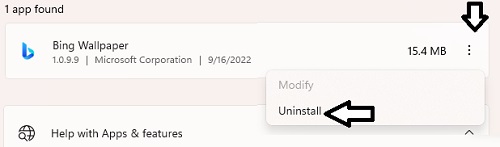
Bing Wall Paper should uninstall in a minute or two.